
Mobile crane scheduling software in West England
For mobile crane hire firms serving West England, UpRate helps you review crane and operator assignments against the agreed contract and dates. Resource Manager brings plant and labour onto the schedule, with timesheets alongside the work. Check saved bookings and any conflicts before confirming the office handover; equipment suitability and safe lifting decisions remain with responsible people.
Free CRM for 1 user with Sales Manager: customers, enquiries, quotes and hire contracts. Larger teams use paid capacity; scheduling, timesheets and invoicing are optional modules. No credit card needed to create your account.
Built around the hire desk.
See assets and labour
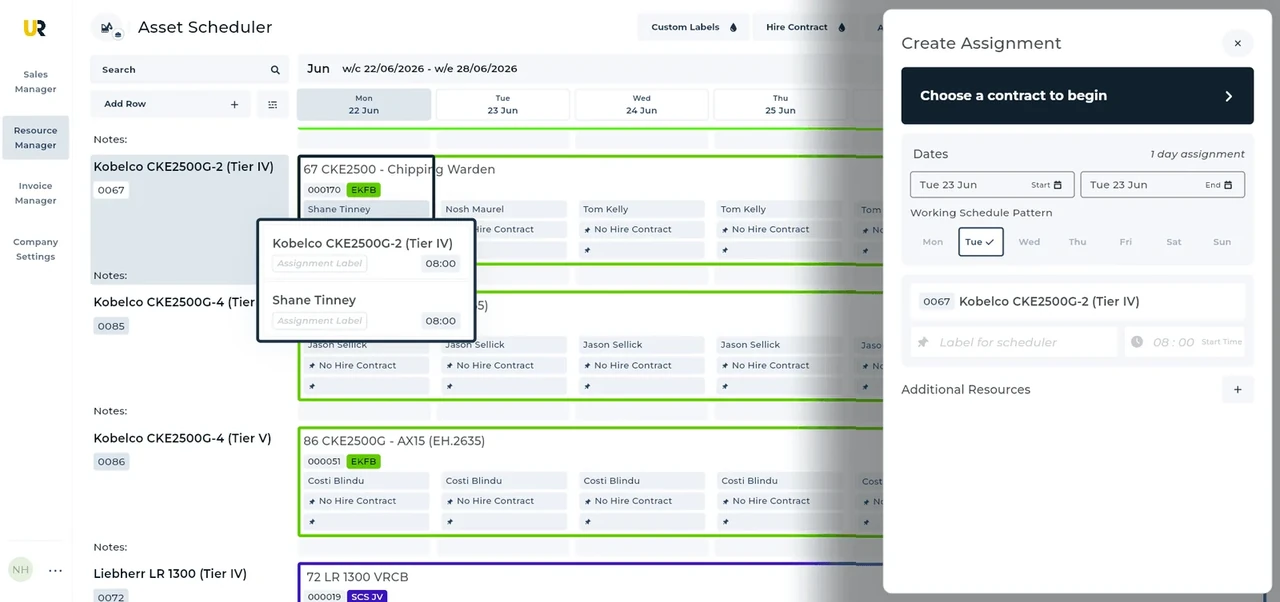
Resource Manager keeps plant and people on the schedule against assignments.
Change the actual booking
Review the assignment when dates or resources change rather than circulating a second allocation list.
Keep the work record
Timesheets remain part of Resource Manager for the office handoff.
Wider UK customer experience.
Read the full customer stories“UpRate has made day-to-day work much easier, everyone has a clearer view of what’s happening, which means fewer follow-ups and better communication with the team.”

West England: Mobile crane scheduling software handover
Illustrative workflow: Illustrative office workflow: The hire desk receives an enquiry described as a west England job. Establish the precise site and next contact instead of treating that broad description as an operating area boundary.
Open the assignment
Locate the contract and affected booking before changing dates or resources.
Review people and plant
Check crane and operator allocations together. Allow for setup, travel and the next job in the office review.
Confirm the revised record
Amend the assignment and review the schedule again before communicating the arrangement.
Confirm the West England site before the next handover
West England is a broad audience description here, not an official administrative region or an exhaustive set of postcode districts.
Before confirming allocation, identify the actual site and the agreed whole attendance period. The person and asset schedules need review together; a broad location or postcode prefix does not establish suitability, travel allowance or availability.
A postcode area, a postcode district and a full unit postcode describe different levels of postal geography. Use the actual site address and full postcode when known; a broad prefix is not enough to establish the site authority or operating arrangements. Postal and administrative boundaries can differ, so check the current official geographic reference and the responsible authority rather than assuming a region name settles the job.
This is shared UK product guidance for teams serving West England. It does not claim a local UpRate office, postcode-based routing or automated authority checks. Follow the linked product guide for controls and verify the actual site arrangements separately.
Your next job.
A little simpler.
Free CRM for 1 user with Sales Manager. No credit card needed to create your account.