
Mobile crane hire software in South England
UpRate helps mobile crane hire company owners and hire desk managers keep the customer, contract, crane and operator allocation connected. Review the agreed job, amend the assignment when arrangements change and keep timesheets with the work. It gives the office a shared booking record without replacing lift planning or site decisions.
Sales Manager is free for 1 user; larger teams use fixed user-capacity bands. Add scheduling and invoicing modules.
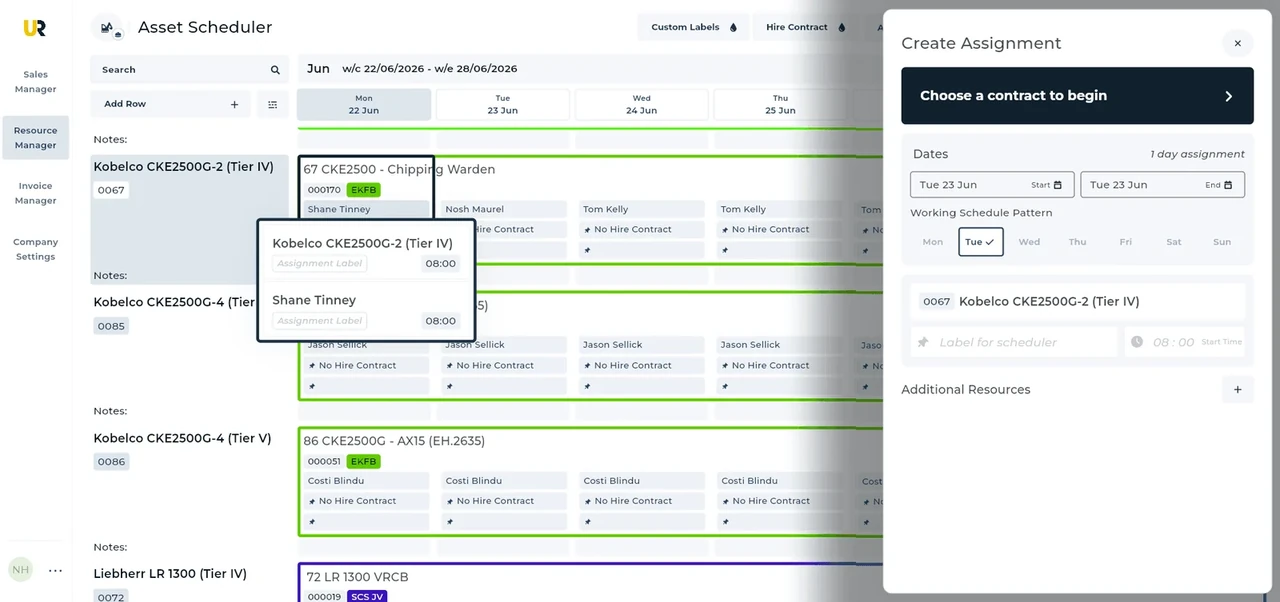
Built around the hire desk.
Start with the agreed hire
Use the customer and hire contract as the shared reference for the site, dates and work, rather than passing disconnected notes between desks.
Book the crane and crew
Allocate assets and labour to assignments on the schedule. Keep the machine and the people doing the work visible together.
Keep amendments connected
Update the assignment when arrangements change and collect timesheets against the work. Review the revised schedule before confirming the office handoff.
A Westminster lift with revised access
Illustrative workflow: A Westminster crane hire needs a new working window after access arrangements change.
Confirm the agreed hire
Keep the customer’s agreed hire and site details in the contract so the office knows which job is affected.
Review the allocation
Once the operator and site team confirm the new window, amend the crane and labour allocation together.
Keep the work connected
Check the changed assignment on the schedule, then keep the recorded work available for the office handoff.
A practical check for South England
For a Westminster job, separate the hire booking from the approvals that make the work possible. The council’s construction code addresses crane oversailing and working arrangements; the site team and crane operator must settle the applicable permissions. If machinery requirements also apply, use the GLA’s current service rather than assuming that a crane booking proves acceptance. A useful hire-desk question is whether the new window changes the arrival, setup or labour arrangement, not merely the start date on an email. Confirm who will tell the desk when access is settled. Then update the contract and assignment. These London examples do not establish a common permit process across South England.
From a hire desk in South England
Read the full customer stories“UpRate has made day-to-day work much easier, everyone has a clearer view of what’s happening, which means fewer follow-ups and better communication with the team.”

Your next job.
A little simpler.
Start with customers and contracts. Add more when you need it.