
How to avoid double-booking cranes and operators
A practical booking process for mobile-crane hire desks: check the machine, operator and working window together before confirming the job.

Check the crane, operator and full working window
To avoid double-booking cranes and operators, check both resources against the full working window before confirming a job. Keep the customer, contract, dates and allocations in one shared record, and update that record whenever the plan changes.
A crane can be free while its operator is already committed. Two jobs can fit on a calendar but overlap once travel, set-up and the return journey are included. Check that the crane and the right people can complete the whole job before their next commitment.
This is a hire-desk planning process, not a lift plan or a substitute for your business’s safety and competency checks. Suitability still needs to be confirmed by the people responsible for the lift.
Capture the enquiry before promising a slot
Record enough detail to make an informed availability check. A request for Tuesday morning is not the same as a confirmed arrival time, and an estimated finish is not a guaranteed release time. Separate what the customer has confirmed from what you still need to find out.
Give the enquiry a clear owner. If another person answers the next call, they should be able to find the latest discussion instead of starting again or making a second promise.
- Customer, site and contact details.
- Requested date, arrival time and likely duration.
- The equipment and people being considered.
- Travel, set-up and other time that affects availability.
- Outstanding information and who will confirm it.
Review crane and operator availability together
Look at the machine’s schedule and the operator’s commitments for the same period. Include known maintenance, leave and other unavailable time in your planning process. Do not treat an empty cell as proof that every part of the job is ready.
For example, a morning job expected to finish at noon may still clash with a second site’s 12.30 arrival. Allow time for travel and the handover. Where the duration is uncertain, agree a realistic buffer before accepting the next job.
Make provisional and confirmed work unmistakable
Agree what each booking status means inside your business. A provisional hold should have an owner and a review point; a confirmed booking should have the customer’s agreed details. Otherwise, one person may release a slot that another thinks is sold.
Choose one place to record the latest plan. Emails and phone calls still matter, but they should lead back to that record. If you change the crane, operator or time after a conversation, update the schedule before taking the next enquiry.
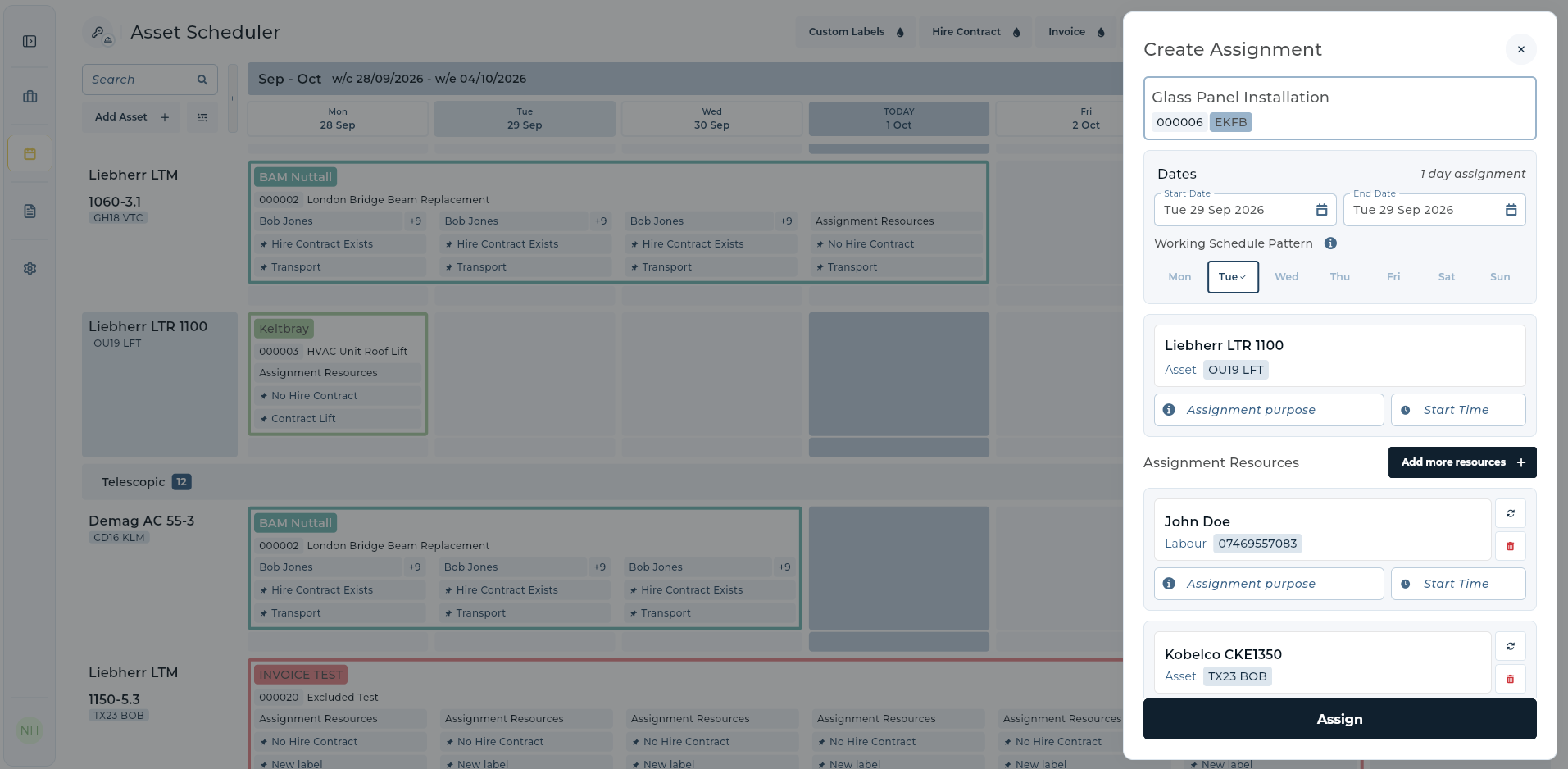
In UpRate, Sales Manager holds customers and contracts, while Resource Manager handles labour and asset scheduling. Use Add more resources in Create Assignment to book paired labour or assets against the same contract and dates. Check the details before assigning, and keep your team’s confirmation process clear.
Recheck the plan when a job changes
An extension, delayed start or replacement machine can affect more than one booking. Check what comes before and after the amended job, including the operator’s next commitment. Tell the people affected which version is now current.
At the end of the day, review tomorrow’s plan together. Focus on unresolved details rather than reading every booking aloud. A short check of uncertain timings and changed allocations can reveal a clash before it reaches the customer.
- Is the agreed start and finish still realistic?
- Are the crane and operator both allocated for that window?
- Does the change affect another job or journey?
- Has the shared booking been updated?
- Do the customer and relevant team members have the current details?
Choose scheduling software around the hire desk
When reviewing crane and operator scheduling software, test a normal enquiry and a difficult amendment. Ask the person on the hire desk to change a date, add another resource and find the linked contract. The workflow should be understandable without rebuilding the job in a separate spreadsheet.
UpRate connects customers, hire contracts, labour and assets, timesheets and invoices through its modules. Start with the customer and contract record, then use the scheduling tools your operation needs. A shared view supports good planning; your team still owns the availability and suitability decisions.
Keep your next booking together.
Start with Sales Manager for customers and hire contracts. Compare modules when you need labour and asset scheduling.
Get started Compare modules