
Mobile crane hire software in Wales
UpRate helps mobile crane hire company owners and hire desk managers keep the customer, contract, crane and operator allocation connected. Review the agreed job, amend the assignment when arrangements change and keep timesheets with the work. It gives the office a shared booking record without replacing lift planning or site decisions.
Free CRM for 1 user with Sales Manager: customers, enquiries, quotes and hire contracts. Larger teams use paid capacity; scheduling, timesheets and invoicing are optional modules. No credit card needed to create your account.
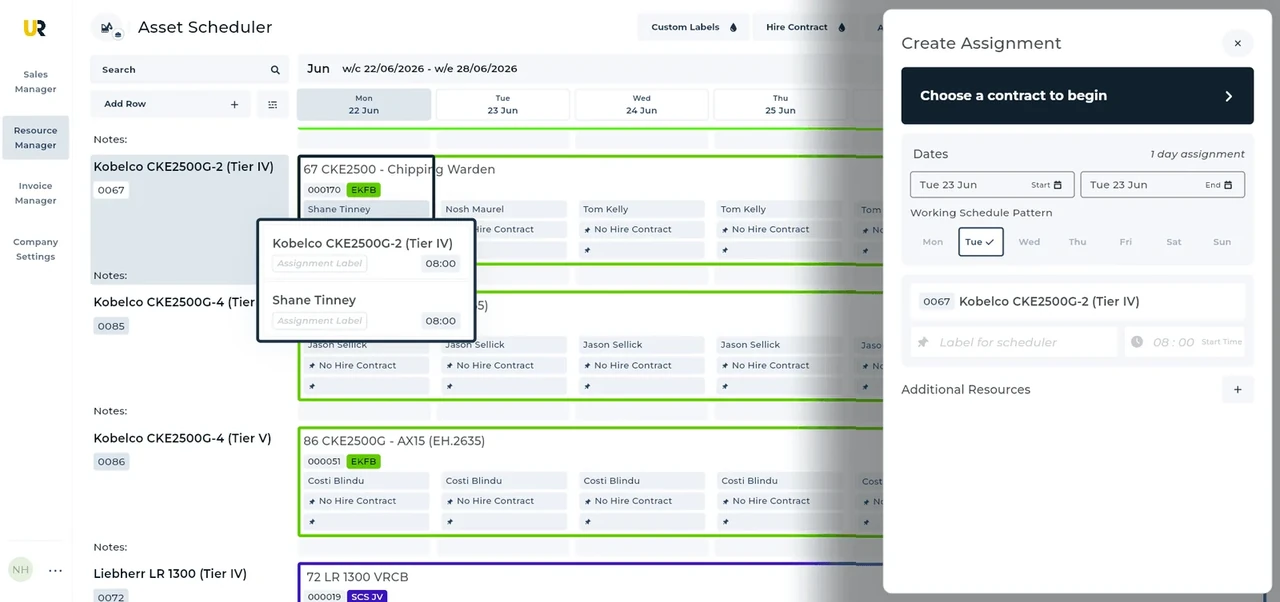
Built around the hire desk.
Start with the agreed hire
Use the customer and hire contract as the shared reference for the site, dates and work, rather than passing disconnected notes between desks.
Book the crane and crew
Allocate assets and labour to assignments on the schedule. Keep the machine and the people doing the work visible together.
Keep amendments connected
Update the assignment when arrangements change and collect timesheets against the work. Review the revised schedule before confirming the office handoff.
Wider UK customer experience.
Read the full customer stories“UpRate has replaced many of our manual processes, allowing us to manage everything in one centralised system.”

A Cardiff highway crane assignment
Illustrative workflow: A Cardiff highway crane job needs a revised assignment after the operator confirms access.
Confirm the agreed hire
Review the customer’s hire contract and the site details that identify the actual operation.
Review the allocation
Once external highway arrangements are settled, allocate the crane and labour to the confirmed working period.
Keep the work connected
If access changes, amend the booking and review the affected schedule before collecting the work record.
A practical check for Wales
For a Cardiff highway operation, the confirmed access arrangement should drive the booking, not the other way round. Cardiff publishes crane-licence guidance covering site and traffic-management considerations. A trunk-road movement can involve a separate process, such as the South Wales agent’s guidance; it does not replace the local crane arrangements. Ask who is responsible for the licence, whether the setup and departure fit the approved window, and which contact will tell the desk if that changes. Then amend the crane and labour assignment together. UpRate does not supply a traffic-management plan, arrange permission, design a lift or validate an operator’s competence. Cardiff’s process is not a single licence system for all Wales.
For a Wales-wide job, identify the road network before choosing the authority contact. North and Mid Wales trunk-road arrangements should not be copied to a South Wales trunk road or a local council road without checking scope. Ask the responsible person to establish the actual route, vehicle or load and any separate site occupation question. Keep those external decisions distinct from the customer’s commercial instruction. When a movement window changes, review setup, arrival and the next booking for both crane and operator. A follow-up can name the outstanding check, but it does not complete a notification. Accounts later needs the agreement and recorded work rather than treating a route arrangement as an approved charge.
Your next job.
A little simpler.
Free CRM for 1 user with Sales Manager. No credit card needed to create your account.