
Mobile crane hire software with Xero integration in Great Britain
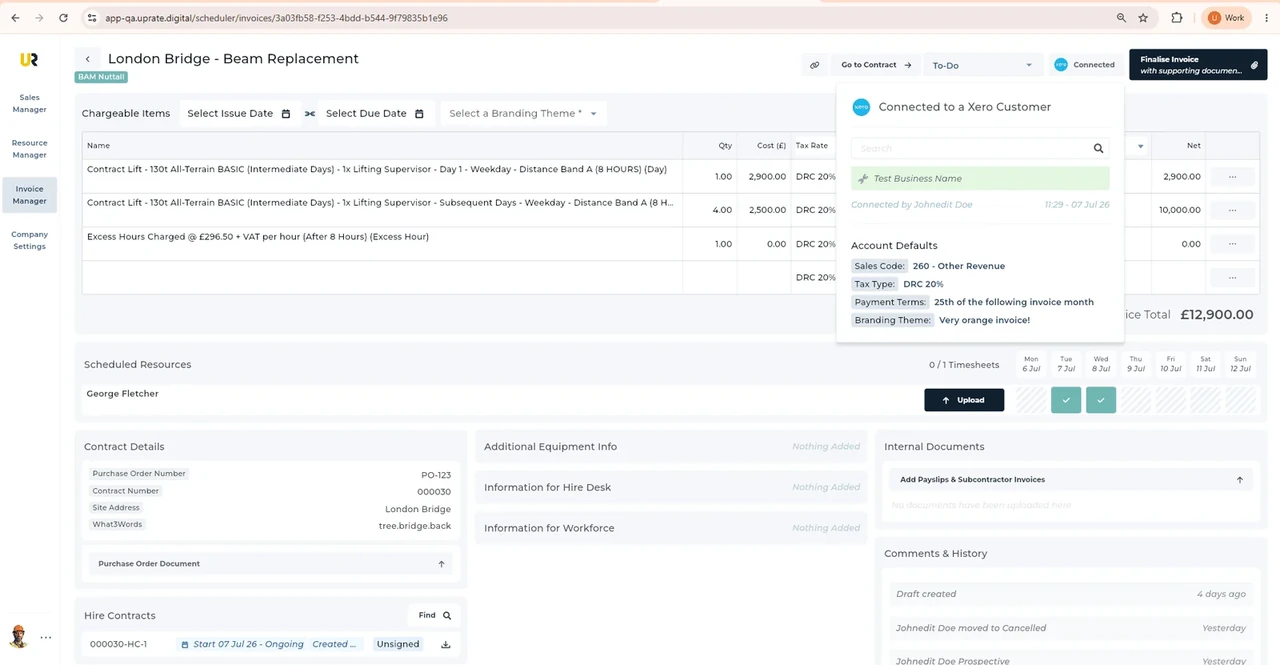
For mobile crane hire firms serving Great Britain, UpRate helps you prepare reviewed invoice charges for the Xero handoff. Invoice Manager connects the accounting workflow with the hire record. Check the intended customer, charge items and available accounting selections before submission. An uncertain result needs checking in the accounting system before another submission.
Free CRM for 1 user with Sales Manager: customers, enquiries, quotes and hire contracts. Larger teams use paid capacity; scheduling, timesheets and invoicing are optional modules. No credit card needed to create your account.
Built around the hire desk.
Keep contract context
Start invoice preparation from the hire agreement and reviewed charge items.
Make tax choices explicit
Accounts reviews Tax Rate and Sales Type rather than relying on an assumed classification.
Retrieve the PDF
The Xero workflow retrieves the invoice document for customer communication.
Wider UK customer experience.
Read the full customer stories“UpRate has replaced many of our manual processes, allowing us to manage everything in one centralised system.”

Great Britain: Mobile crane hire software with Xero integration handover
Illustrative workflow: Illustrative office workflow: A customer based in one home nation requests crane attendance in another. Identify the actual site country before passing the hire to operations.
Review the source items
Confirm the customer and hire contract before importing charge items into invoice preparation.
Check the accounting choices
Review quantities, descriptions and rates, then select Tax Rate and Sales Type with accounts.
Check the returned document
Submit to Xero and retrieve the invoice PDF. Review the result and use the agreed customer sending route.
Confirm the Great Britain site before the next handover
Great Britain means England, Scotland and Wales; it excludes Northern Ireland. Britain and GB refer to this same audience here.
Before the Xero handoff, check the customer and charge items against the agreed job. A postcode or region label does not decide tax treatment. Accounts reviews Tax Rate and Sales Type, then the returned invoice PDF and the buyer’s submission route.
A postcode area, a postcode district and a full unit postcode describe different levels of postal geography. Use the actual site address and full postcode when known; a broad prefix is not enough to establish the site authority or operating arrangements. Postal and administrative boundaries can differ, so check the current official geographic reference and the responsible authority rather than assuming a region name settles the job.
This is shared UK product guidance for teams serving Great Britain. It does not claim a local UpRate office, postcode-based routing or automated authority checks. Follow the linked product guide for controls and verify the actual site arrangements separately.
Your next job.
A little simpler.
Free CRM for 1 user with Sales Manager. No credit card needed to create your account.