
Plant hire CRM in Northern Ireland
UpRate gives plant hire company owners and hire desk managers a shared place for customer records, contacts and hire contracts. Keep job and site details with the customer, then add scheduling or invoicing when needed. Keep the hire desk’s customer-to-contract handoff clear.
Sales Manager is free for 1 user; larger teams use fixed user-capacity bands. Add scheduling and invoicing modules.
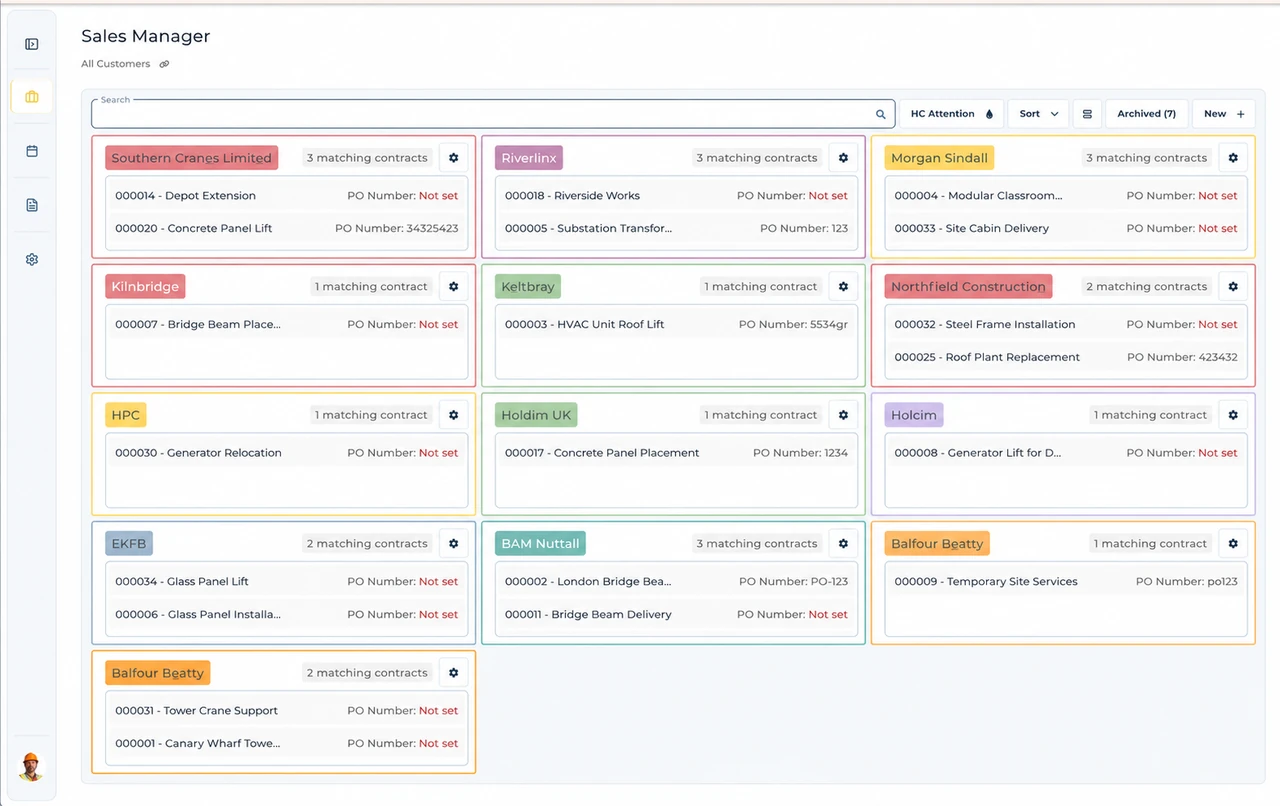
Built around the hire desk.
Find the right customer
Keep customer and contact records in Sales Manager, so the hire desk has a consistent place to find the organisation behind the job.
Keep contracts with the customer
Create and edit hire contracts from the customer record. Keep the job and site details attached to the agreement instead of splitting them across email threads.
Add operations when needed
Sales Manager is the foundation of your subscription. Add scheduling or invoicing without treating them as separate customer-management systems.
A Northern Ireland public-order customer record
Illustrative workflow: A hire firm agrees Northern Ireland public-sector work and needs the resulting customer and contract in one place.
Confirm the agreed hire
Identify the organisation actually purchasing the hire after the external procurement activity is complete.
Create the hire contract
Create the customer and hire contract with agreed site details and the buyer’s reference.
Keep the handoff connected
Review approved amendments before passing the record to scheduling or invoicing when included.
A practical check for Northern Ireland
eTendersNI is the official procurement service referenced by Northern Ireland’s Department of Finance; it is not a customer database inside UpRate. After work is agreed, establish which organisation placed the hire and which person can authorise changes. Belfast City Council’s supplier instructions illustrate the need to check the actual buyer’s order and invoice requirements. Ask whether the site contact and paying customer differ and whether an extension needs a revised reference. Keep agreed job and site details with the hire contract so the office can follow the customer record. UpRate does not submit bids, integrate with eTendersNI or provide cross-border tax advice. Other Northern Ireland buyers may use different commercial instructions.
Wider UK customer experience.
Read the full customer stories“UpRate has replaced many of our manual processes, allowing us to manage everything in one centralised system.”

Your next job.
A little simpler.
Start with customers and contracts. Add more when you need it.