
Plant and labour scheduling software in Northern Ireland
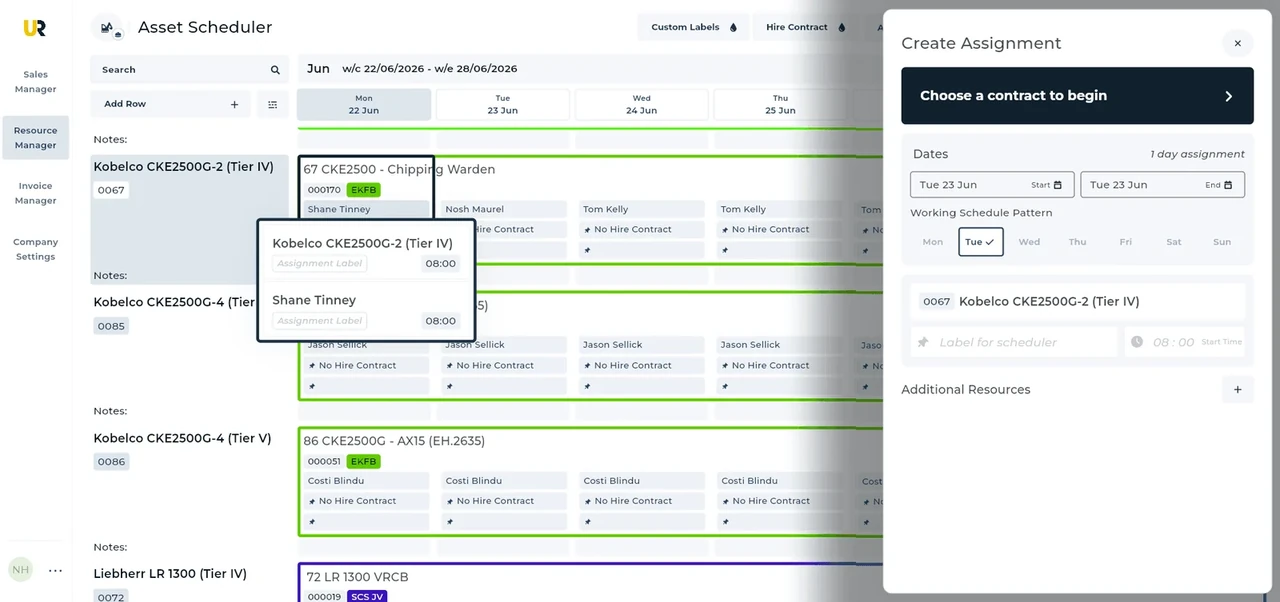
UpRate helps hire desk managers organise plant and labour assignments against agreed customer work. Review the schedule, amend allocated resources when dates change and keep timesheets with the assignment. Choose Resource Manager to connect the working plan with the contract instead of maintaining a separate resource spreadsheet.
Sales Manager is free for 1 user; larger teams use fixed user-capacity bands. Add scheduling and invoicing modules.
Built around the hire desk.
See the working schedule
Bring plant and labour records into Resource Manager and view assignments on the schedule before confirming the next job.
Amend the actual assignment
Change dates or allocated resources when the customer changes the work. Review the affected bookings rather than assuming the old allocation still applies.
Collect the work record
Keep timesheets with scheduled resources. The office can review what was recorded against the assignment before preparing the next handoff.
A movement-dependent Northern Ireland assignment
Illustrative workflow: A Northern Ireland plant assignment changes when the operator confirms a different arrival period.
Confirm the agreed hire
Review the contract and the work expected at site before treating the arrival date as settled.
Review the allocation
Have the operator confirm external movement arrangements, then amend the plant and labour assignment together.
Keep the work connected
Check affected bookings and keep the timesheet for the actual work available to the office.
A practical check for Northern Ireland
An arrival change can affect an operator’s whole assignment, not just the delivery time. PSNI publishes abnormal-load guidance and identifies a separate DfI road-authority process; the responsible operator must confirm what applies to the actual movement. Use DfI’s current contact guidance rather than relying on an old address copied into a booking note. Ask who will confirm arrival, whether the site can accept the revised period, and which labour allocation depends on it. Review the changed dates in UpRate before confirming the office handoff. Keep planned dates separate from the recorded work. Resource Manager does not notify authorities, choose a permitted route or establish cross-border movement rights.
Wider UK customer experience.
Read the full customer stories“UpRate has replaced many of our manual processes, allowing us to manage everything in one centralised system.”

Your next job.
A little simpler.
Start with customers and contracts. Add more when you need it.