
Mobile crane timesheet software in South England
For mobile crane hire firms serving South England, UpRate helps you keep timesheet collection connected to the worker, contract and week. Resource Manager includes scheduling and timesheets. Check the saved document entry after uploading, resolve missing or incorrect files, and give accounts the right work record before reviewing the agreed charges.
Free CRM for 1 user with Sales Manager: customers, enquiries, quotes and hire contracts. Larger teams use paid capacity; scheduling, timesheets and invoicing are optional modules. No credit card needed to create your account.
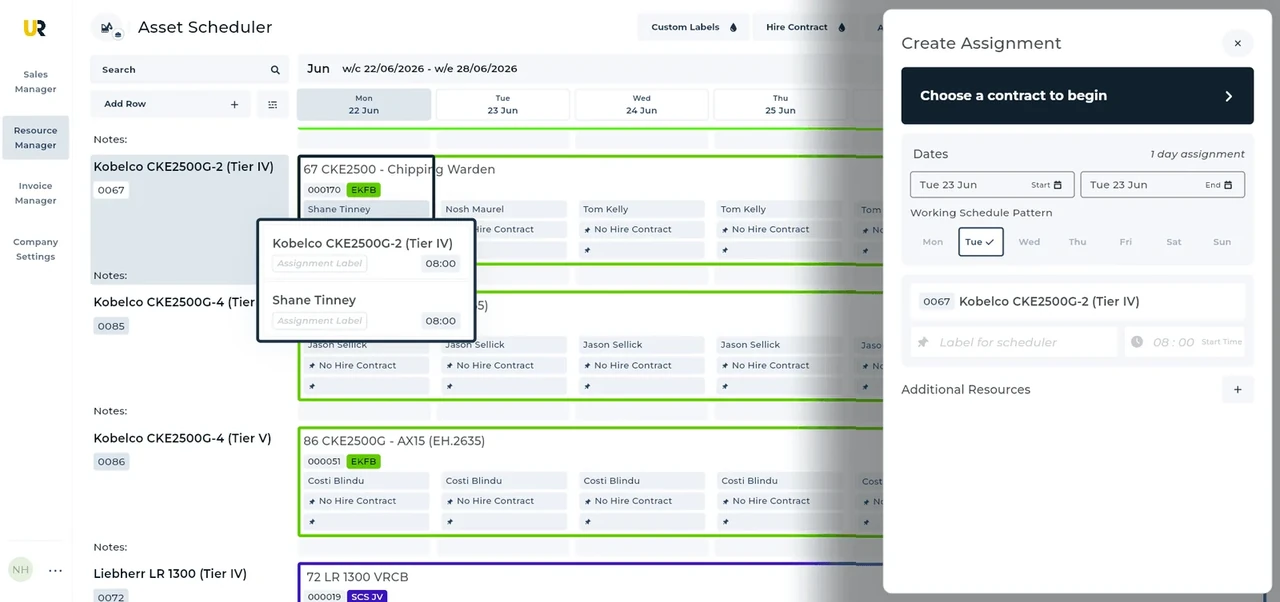
Built around the hire desk.
Find the assignment
Keep timesheet collection connected to scheduled plant and labour in Resource Manager.
Review exceptions
Investigate changed attendance instead of assuming the booking is the final charge.
Explain the accounts handoff
Retain contract and assignment context while the office checks work and prepares invoice details.
From a hire desk in South England
Read the full customer stories“UpRate has made day-to-day work much easier, everyone has a clearer view of what’s happening, which means fewer follow-ups and better communication with the team.”

South England: Mobile crane timesheet software handover
Illustrative workflow: Illustrative office workflow: A customer’s south England order moves to a different site. Recheck the site contact and working instruction rather than treating the broad region as sufficient location information.
Identify the work
Open the correct assignment and confirm the resource and date before reviewing its timesheet.
Resolve the difference
Compare recorded attendance with the hire and ask the responsible contact about changed or missing details.
Prepare the handover
Keep the reviewed timesheet with the assignment. Accounts separately checks contract charge items when invoicing.
Confirm the South England site before the next handover
South England is a broad audience description within England. It is not the south of the whole UK or a fixed administrative or postcode boundary.
When reviewing attendance, match the work record to the actual assignment and site rather than a regional office label. Resolve changed instructions and missing details before accounts treats the record as evidence for a particular job.
A postcode area, a postcode district and a full unit postcode describe different levels of postal geography. Use the actual site address and full postcode when known; a broad prefix is not enough to establish the site authority or operating arrangements. Postal and administrative boundaries can differ, so check the current official geographic reference and the responsible authority rather than assuming a region name settles the job.
This is shared UK product guidance for teams serving South England. It does not claim a local UpRate office, postcode-based routing or automated authority checks. Follow the linked product guide for controls and verify the actual site arrangements separately.
Your next job.
A little simpler.
Free CRM for 1 user with Sales Manager. No credit card needed to create your account.