
Plant hire CRM in North England
UpRate gives plant hire company owners and hire desk managers a shared place for customer records, contacts and hire contracts. Keep job and site details with the customer, then add scheduling or invoicing when needed. Keep the hire desk’s customer-to-contract handoff clear.
Sales Manager is free for 1 user; larger teams use fixed user-capacity bands. Add scheduling and invoicing modules.
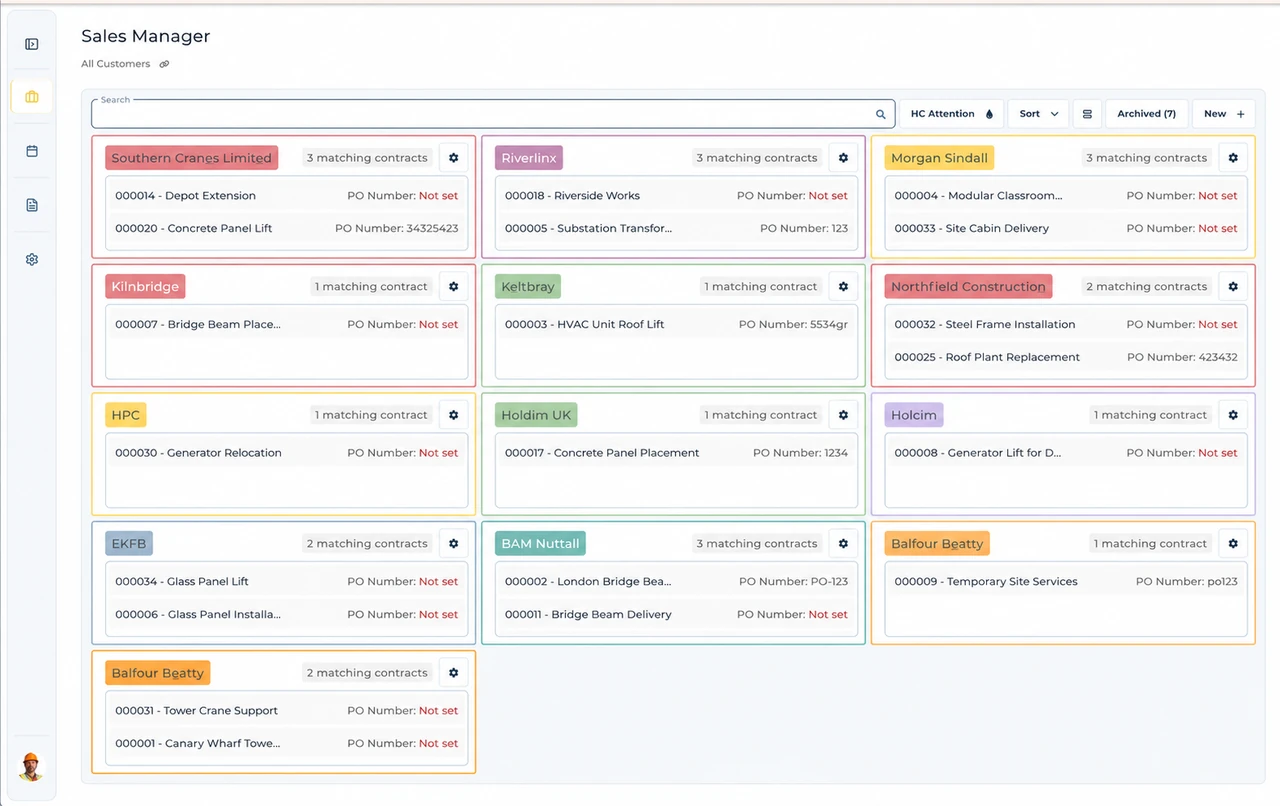
Built around the hire desk.
Find the right customer
Keep customer and contact records in Sales Manager, so the hire desk has a consistent place to find the organisation behind the job.
Keep contracts with the customer
Create and edit hire contracts from the customer record. Keep the job and site details attached to the agreement instead of splitting them across email threads.
Add operations when needed
Sales Manager is the foundation of your subscription. Add scheduling or invoicing without treating them as separate customer-management systems.
A Manchester order-to-contract handoff
Illustrative workflow: A Manchester public-buyer hire arrives with separate purchasing and site contacts.
Confirm the agreed hire
Find the buying organisation and check the contact details instead of treating the project nickname as the customer.
Create the hire contract
Create the hire contract from the agreed order, with the job and site details the desk needs.
Keep the handoff connected
Review customer-approved amendments and pass the contract to scheduling or invoicing when those modules are included.
A practical check for North England
The contact who needs a machine may not be the person able to place the order. Manchester City Council publishes purchase-order requirements for suppliers, while Leeds has its own invoice instructions. On a Manchester buyer job, establish the buying organisation, order reference and authority for amendments before the contract moves to operations. Ask whether the invoice recipient differs from the site contact and whether an extended hire needs a revised order. Keep the customer and agreed job details connected, rather than leaving accounts to reconstruct the request from messages. These are named-buyer examples, not a common procurement policy for North England. UpRate does not issue the buyer’s order or automate its approval process.
Wider UK customer experience.
Read the full customer stories“UpRate has replaced many of our manual processes, allowing us to manage everything in one centralised system.”

Your next job.
A little simpler.
Start with customers and contracts. Add more when you need it.