
Plant hire software with Xero integration in North England
UpRate helps plant hire company owners and accounts teams prepare invoices from connected hire records. Import contract charge items, review customer details and invoice choices, then submit to Xero and retrieve the invoice PDF. Choose invoicing with or without resource scheduling; human review remains part of the workflow before submission.
Sales Manager is free for 1 user; larger teams use fixed user-capacity bands. Add scheduling and invoicing modules.
Built around the hire desk.
Prepare charges from the contract
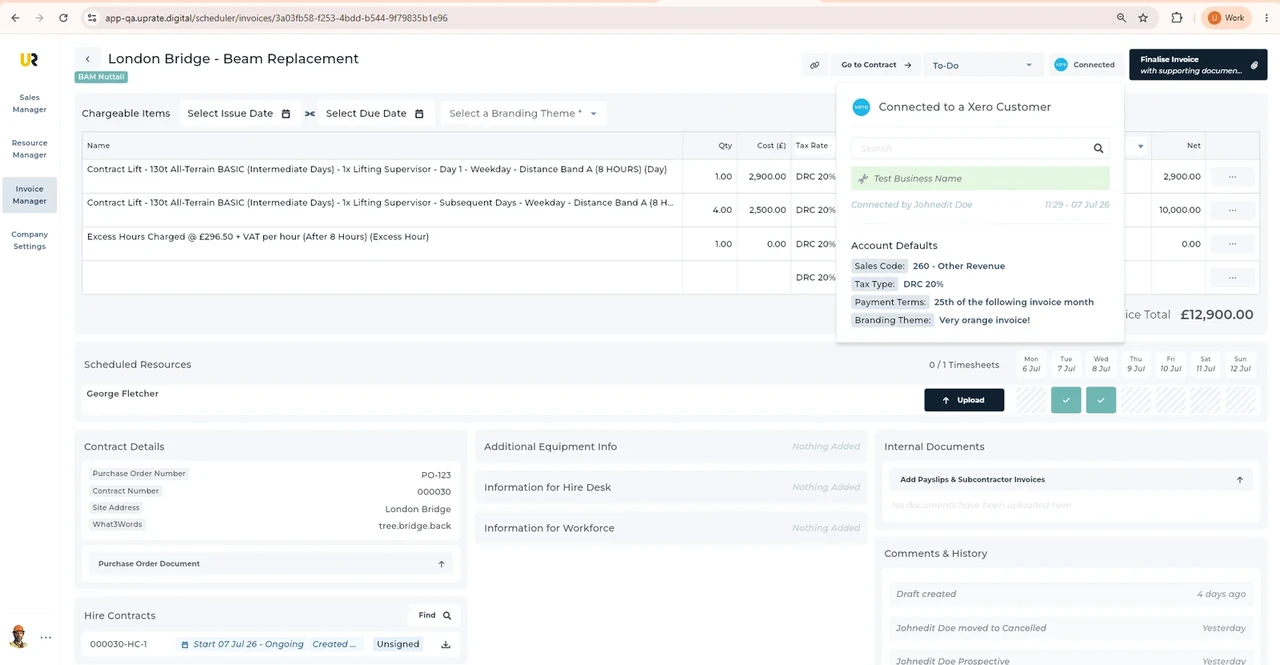
Invoice Manager can import charge items from a hire contract. Review the description, quantities and rates against the work before sending the invoice.
Review the Xero handoff
Fill out Chargeable Items, choose the Tax Rate and Sales Type, then submit to Xero. Those choices need the accounts team’s review, not a software assumption.
Get the invoice document
UpRate retrieves the invoice PDF from Xero for you to send to the customer. Keep the contract accessible while checking invoice details and status.
A Leeds invoice with clear supply dates
Illustrative workflow: A Leeds buyer needs an invoice that identifies the hire period and agreed supply.
Confirm the agreed hire
Review the contract, charge items and recorded work before preparing the invoice description.
Review the invoice
Check the buyer’s order reference, recipient and supply dates alongside the accounts team’s tax and sales choices.
Send the reviewed document
Submit the reviewed invoice to Xero, retrieve its PDF and deliver it through the buyer’s requested channel.
A practical check for North England
Accounts should not have to guess which hire period an invoice covers. Leeds City Council publishes invoice instructions covering the purchase order and supply description; Manchester has its own purchase-order process. For a Leeds buyer job, ask which department or contact receives the document and whether one contract contains charges that need separate explanation. Review service dates and quantities against the agreed hire before the Xero handoff. Keep an amendment with the contract rather than relying on the original request alone. These buyer policies do not determine the format for every northern customer. UpRate does not approve the council’s order, confirm invoice acceptance or decide the correct tax treatment.
Wider UK customer experience.
Read the full customer stories“UpRate has replaced many of our manual processes, allowing us to manage everything in one centralised system.”

Your next job.
A little simpler.
Start with customers and contracts. Add more when you need it.