
Plant hire software with Xero integration in Scotland
UpRate helps plant hire company owners and accounts teams prepare invoices from connected hire records. Import contract charge items, review customer details and invoice choices, then submit to Xero and retrieve the invoice PDF. Choose invoicing with or without resource scheduling; human review remains part of the workflow before submission.
Sales Manager is free for 1 user; larger teams use fixed user-capacity bands. Add scheduling and invoicing modules.
Built around the hire desk.
Prepare charges from the contract
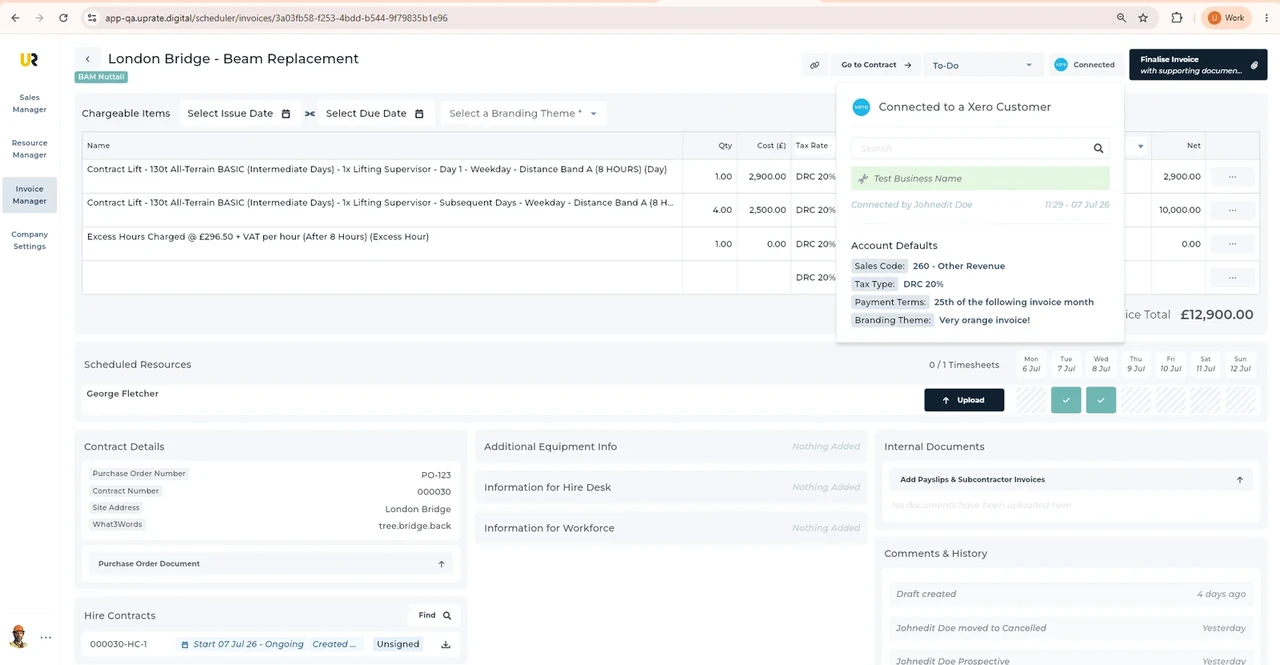
Invoice Manager can import charge items from a hire contract. Review the description, quantities and rates against the work before sending the invoice.
Review the Xero handoff
Fill out Chargeable Items, choose the Tax Rate and Sales Type, then submit to Xero. Those choices need the accounts team’s review, not a software assumption.
Get the invoice document
UpRate retrieves the invoice PDF from Xero for you to send to the customer. Keep the contract accessible while checking invoice details and status.
An Edinburgh order-to-invoice review
Illustrative workflow: An Edinburgh buyer’s hire spans amended dates and accounts must reconcile it with the order.
Confirm the agreed hire
Review the contract and any agreed extension before importing charge items for the invoice.
Review the invoice
Check the buyer’s order, recipient and required document details before choosing Tax Rate and Sales Type.
Send the reviewed document
Submit the reviewed invoice to Xero, retrieve its PDF and send it using the buyer’s instructions.
A practical check for Scotland
A contract extension can be straightforward on the schedule and less straightforward on the invoice. Edinburgh’s supplier guidance sets out its order and invoice submission requirements; use the actual purchaser’s instructions before combining charges. Public Contracts Scotland is relevant to finding and winning public work, but it is not the invoice delivery channel inside UpRate. Ask whether the amended hire belongs to the same buyer order and who can confirm any change. Review dates, descriptions and quantities with accounts before submission to Xero. Retrieving an invoice PDF does not mean it was accepted or paid by the buyer. UpRate does not obtain an amended purchase order or provide tax advice.
From a hire desk in Scotland
Read the full customer stories“UpRate has replaced many of our manual processes, allowing us to manage everything in one centralised system.”

Your next job.
A little simpler.
Start with customers and contracts. Add more when you need it.