
JCB investment: a fleet planning checklist for hire desks
JCB’s September announcement provides a prompt to review your next fleet purchase. Use this checklist to connect an investment decision with the first hire.

What JCB announced in September
On 28 September 2026, JCB announced a £100 million transformation of its Staffordshire headquarters. The programme includes a £60 million automated powder paint plant. Its announcement followed Hydromax’s hydrogen-powered land speed record of 406.320mph in August.
For a hire desk considering another machine, our takeaway is to test the purchase against specific work and a practical handover plan. The checklist below is UpRate’s operational analysis. It is not JCB’s advice or a forecast of demand, delivery dates or investment returns.
Describe the work the next machine would cover
Start with enquiries your team could not fulfil. Record the requested machine specification, dates, site requirements and the reason the work was declined. A request lost because of price needs a different response from one lost because every suitable asset was already committed.
Group requests for the same period before counting them as opportunities. One proposed machine cannot cover several simultaneous hires. Keep enquiries separate from confirmed customer commitments and note whether the customer accepted an alternative or the job disappeared. Give the purchase decision evidence that colleagues can check.
Confirm the supplier details for your own order
Ask the supplier to confirm the exact specification, attachments, commercial terms and expected delivery date in writing. Record what remains provisional and when the next update is due. Base customer promises on information about your order; a manufacturer’s investment announcement does not confirm a delivery slot.
Agree who tells the hire desk when that date changes. If a first hire depends on the arrival, identify the person responsible for updating the customer and checking any substitute. Include transport and preparation time when working out the earliest realistic start.
For an illustrative handover, suppose delivery is expected on Thursday and a customer requests Monday. Ask the yard to confirm whether the available interval allows receipt checks and preparation. Ask transport to confirm the Monday movement. Record who must approve readiness before the hire desk confirms the job. If either answer is outstanding, give the customer a clear update time and keep the booking’s status accurate. This example describes a planning conversation; it is not a recommended preparation period for any particular machine.
Prepare the records before the first booking
Choose a consistent fleet identifier and check whether a resource record already exists. Give the yard and office the same name to use. Keep the supplier’s expected arrival separate from the date your team confirms the asset is ready for hire.
Use a short handover checklist with a named owner for each unfinished item. Treat it as your internal process, with the technical and safety checks appropriate to the equipment completed by the responsible people.
- Check the delivered asset and attachments against the order.
- Confirm the documents and preparation your team requires before release.
- Agree the hire rates and any applicable transport or attachment charges.
- Check who can deliver, collect or operate it for the proposed job.
- Tell the hire desk when it may accept the first confirmed commitment.
Check the first assignment against the contract
Before confirming the first job, read back the customer, contract, asset and working dates together. Check the operator where required and allow for the journey to site. An arrival delayed by a day can affect the next commitment as well as the first one.
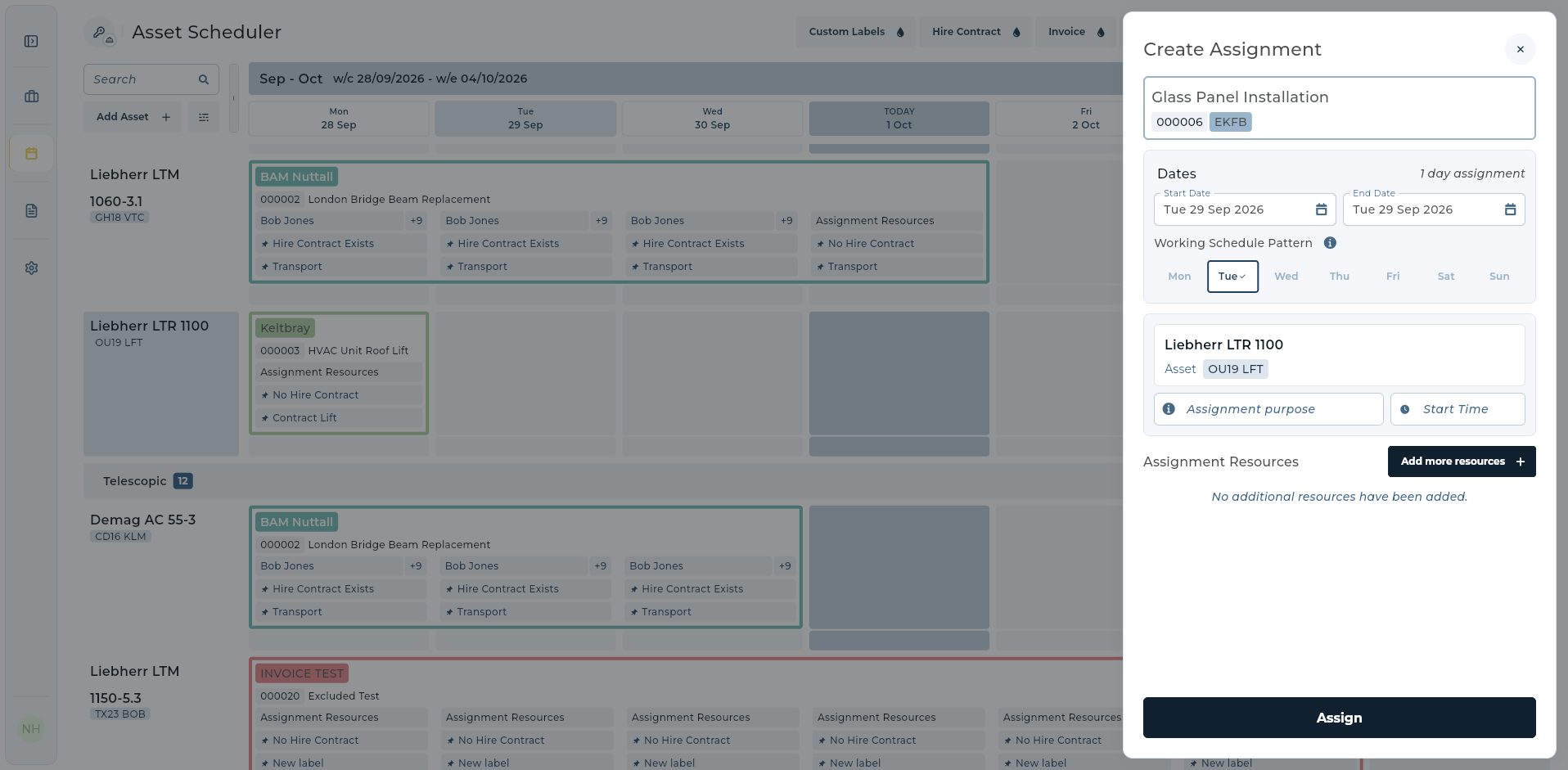
UpRate’s Resource Manager supports asset and labour scheduling and assignments. The existing product screen below shows a selected contract, date and asset in Create Assignment. Adding a resource record is a separate action from booking work; check the resulting assignment after submitting it.
Set a date to review the purchase assumptions
Keep the original purchase case and choose a review date. Compare the work you expected with confirmed bookings and the charges actually agreed. Record why any gaps arose, such as a late arrival, a changed customer programme or a different specification being needed.
Bring the hire desk, yard and accounts into that review. Assign an owner and next action to each unresolved issue. Those notes give the next fleet decision a concrete starting point and show which parts of the handover need attention.
Connect the records behind your next hire.
Start with customers and contracts in Sales Manager. Compare modules for Resource Manager scheduling as your operation needs it.
Get started Compare modules