
Plant hire fleet utilisation: why a busy fleet can still lose revenue
A machine leaving the yard is not proof it is earning what you agreed. Learn how to check fleet utilisation, record hire changes and connect bookings to invoices before buying more plant.
Check the existing fleet before buying more plant
Plant hire fleet utilisation measures how much of your fleet’s available time is committed to hire. For a hire company, improving it starts with knowing what is available, matching plant and people to confirmed work, and checking that agreed chargeable work reaches the invoice.
A full booking board can still leave agreed work unbilled. An extension may never reach accounts, or agreed extra operator hours may remain on a timesheet. An apparently empty slot may belong to a machine still waiting for collection or a return check.
Before buying more plant, check how bookings reach accounts for the fleet you already own. Reconcile agreed chargeable work with invoice lines and resolve any gaps. This helps you distinguish a need for more capacity from incomplete records.
Why fleet optimisation matters in 2026
IPAF’s 2026 Rental Market Reports, published on 18 June, say the European powered access rental market grew by 2% in 2025, while fleet growth slowed to 1%. The UK was among the markets under pressure, and rental firms were prioritising replacement and optimisation over expansion. These figures cover powered access, not every excavator, telehandler or mobile crane fleet.
For the wider UK plant hire sector, the CPA’s 14 September 2026 Budget submission calls for action on investment and employment costs, including a timetable for extending Full Expensing to plant hire companies. Its proposals reflect pressures that operational improvements alone cannot remove.
Our view is that this makes the case for better fleet visibility stronger. More machines create more commitments. If your hire desk cannot explain which bookings became invoice lines, expansion can multiply an existing process problem.
Measure booked time, billing and contribution separately
One utilisation percentage cannot answer every commercial question. For a simple internal review, calculate booked utilisation as confirmed hire days divided by available days, multiplied by 100. Define the available-day basis first and keep it consistent across periods. Record maintenance and other unavailable time separately so a shrinking denominator does not disguise a problem.
An engine-hours reading answers a different question from a hire schedule. A self-drive machine may be chargeable under the agreed hire terms while the customer is not operating it. An operated hire may depend on agreed hours, minimum periods and approved timesheets. Check the contract before deciding what should be billed.
Review the following alongside your booking figure. Compare similar machine categories and hire arrangements; a mini excavator on weekly self-drive hire and a mobile crane on individual operated jobs need different working assumptions.
- Booked time: confirmed commitments against your consistently defined available time.
- Billing completeness: agreed chargeable days or hours reconciled with invoice lines, allowing for valid credits and adjustments.
- Hire revenue per asset: use the same reporting period and separate machine hire from labour, transport and other charges where your records allow it.
- Contribution: review the revenue alongside the costs of delivering the hire, then account for ownership and overhead costs before treating it as profit.
A worked example: 80% booked, but £400 still unexplained
Consider an illustrative machine with 20 available working days in a month. It is booked for 16 days at an agreed £200 per chargeable day. On that simple basis, booked utilisation is 16 ÷ 20 × 100 = 80%, with expected machine hire charges of £3,200 before VAT.
Now suppose accounts has prepared invoice lines for only 14 days: £2,800. The two-day, £400 difference is a question to resolve. It might be missing paperwork, an unrecorded amendment, a valid cancellation or an agreed credit. Check the evidence rather than automatically adding a charge.
This is a hypothetical example, not an UpRate customer result or an industry benchmark. It shows why the schedule and invoice should be reconciled. Booked time, invoiced revenue and cash received are three different stages; none of them alone proves the machine’s profitability.
Make availability mean ready for the next hire
A blank space on a scheduler should prompt an availability check. Has the current hire actually ended? Is collection arranged? Has the returned machine been checked? Is a required attachment available? For operated plant, can the right person attend for the whole assignment?
Agree who updates these records and when. Record provisional enquiries distinctly from confirmed commitments using your team’s documented process. When dates change, check the next booking as well as the current one; an extension can consume the time that was intended for transport, checks or another customer.
Where plant and labour are booked together, review both resources against the same contract and dates. Check that they can reach the site and complete the assignment together.
Record hire changes where the next person can find them
An extension agreed during a phone call still needs an operational record. So does an off-hire request, a replacement machine or a change to operator hours. Capture the customer, contract, resource, effective date and agreed commercial treatment, with the supporting confirmation your process requires.
An off-hire notice and a collection date are separate facts. The agreed terms determine the chargeable period; the logistics determine when the asset can be ready for another job. Keep both clear rather than assuming one date answers both questions.
If the yard, hire desk and accounts each maintain their own version, the same amendment has several chances to be lost. Give the job one current record, a responsible owner and a clear handover to whoever prepares the invoice.
- Confirm what changed and when it takes effect.
- Record the customer’s agreement and any rate or charge implications.
- Update the affected asset and labour bookings.
- Check the next commitment and transport arrangements.
- Pass the evidence to accounts before the invoice is prepared.
Close the gap between the schedule and the invoice
At your normal invoicing cut-off, reconcile confirmed work against the information accounts has received. For operated plant, check timesheets and agreed hours. For self-drive hire, check the contractual charging basis, start and end records, and documented amendments. Review attachments, delivery and collection charges only where they have been agreed and apply.
Assign unresolved items to someone with a clear next action. An invoice held for a missing purchase-order reference needs a different fix from a disputed extension. Keep those reasons visible so the same exception does not return every week.
The checking process should make the invoice easier for the customer to understand. Clear contract references, correct periods and supporting documents can help the customer assess it without chasing the hire desk for the basic story.
How UpRate connects plant hire bookings to billing
UpRate brings the records behind a hire into a connected workflow. Sales Manager holds customers and contracts. Resource Manager adds asset and labour scheduling, assignments and timesheets. Invoice Manager supports invoice preparation. Choose the package that includes the parts your operation needs; scheduling and invoicing are not included in every package.
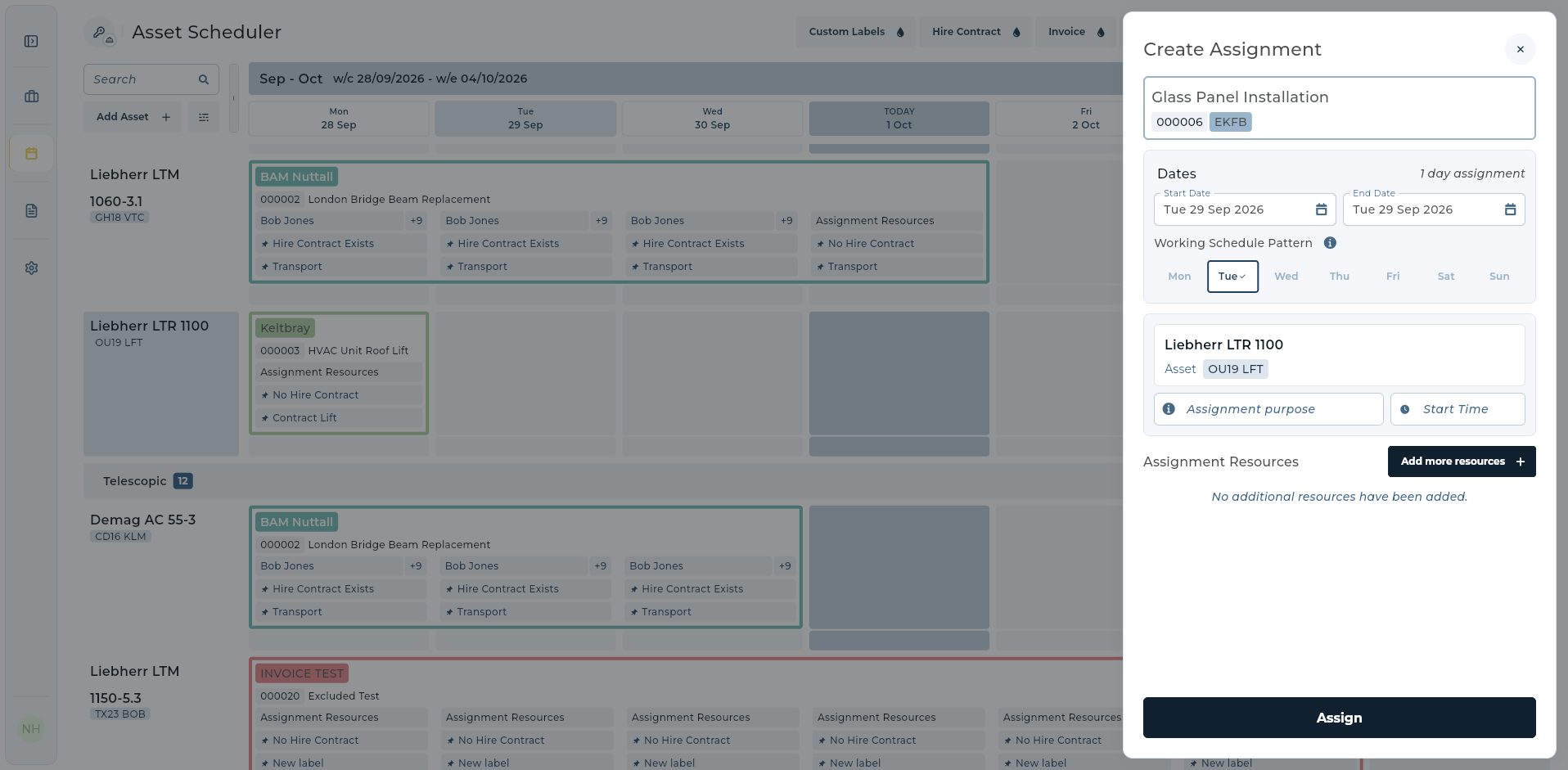
The assignment screen below is a real UpRate product image. It connects a selected contract, date and asset. That relationship gives the hire desk a concrete record to check when the job changes and accounts a clearer starting point than a separate coloured spreadsheet cell.
When preparing an invoice in UpRate, check the supporting timesheets and contract documents, then review the chargeable items against the agreed work. Before sending, choose which supporting files the customer should receive. Keeping a document with the job and including it in the invoice package are separate decisions.
Run a weekly fleet utilisation review
Start with one machine category and a consistent review period. Ask the hire desk, yard and accounts to examine the same jobs. Separate a lack of customer demand from unavailable plant, incomplete booking records and unbilled agreed work; each needs a different response.
Use this checklist before deciding the fleet needs to grow. Keep a record of the exceptions you find, the reason and the action taken. Over several periods, those records give you a firmer basis for deciding whether to improve the workflow, change the fleet mix or invest in capacity.
- Confirm which assets are ready, committed or unavailable and why.
- Review gaps between hires and the expected next booking.
- Check extensions, off-hire requests and replacement assets against the current record.
- Resolve missing timesheets or customer references with a named owner.
- Reconcile agreed chargeable work with the invoice lines.
- Review revenue and delivery costs by asset or comparable machine group.
Common questions about plant hire fleet utilisation
What is a useful fleet utilisation target? Set a target by machine category, hire arrangement and your own cost base. A single percentage across every asset can conceal weak performance. Review it alongside revenue and costs rather than borrowing a number from a different type of fleet.
Is a machine on hire the same as a machine being used? No. Booking records show hire commitments; engine hours show operation. The agreed hire terms determine what is chargeable. Do not infer the invoice solely from either the machine’s location or its engine hours.
Can plant hire software improve utilisation? It can help the team work from clearer availability, assignments and billing records. The benefit depends on keeping those records accurate and acting on the gaps. Software cannot create demand or make an unsuitable machine right for a job.
Should we buy more machines or improve the booking process first? Review the existing fleet first. Consistent demand that you cannot fulfil with suitable available plant is a different investment case from capacity that looks exhausted because returns, amendments or schedules are out of date.
Make every hire easier to follow.
Start with customers and contracts in Sales Manager. Compare the modules that add Resource Manager scheduling and Invoice Manager to connect the rest of your hire workflow.
Get started Compare modules