
Plant hire purchase orders: a hire desk checklist
Check the buyer’s PO, agreed hire and invoice instructions before paperwork moves from the hire desk to accounts.

Start with the buyer’s reference
Before dispatch or invoice preparation, check the customer’s purchase order against the agreed hire: who issued it, what work it covers and which reference accounts must quote. The PO number alone does not confirm that the site, equipment or hire period matches the booking.
A purchase order, usually shortened to PO, comes from the buyer. Your hire contract number identifies your agreement or job record; your invoice number identifies the bill you issue. Keep those references distinct, even when they appear together on the same document. Xero’s purchase-order guide explains the buyer-to-supplier process and matching an invoice to the order.
For example, the customer may give you PO-417 while your contract is C-208 and your invoice is INV-936. If the customer requires a PO reference, accounts needs to quote PO-417 alongside your invoice number. Replacing one with another can leave the customer unable to match the paperwork.
Confirm the customer’s invoice rules early
Ask the customer’s accounts or purchasing contact how invoices should be submitted. The person booking a machine may know the site requirements but have no authority to raise an order or approve extra spend. Record who books the hire, who authorises it and who can resolve a PO query.
Check whether a PO is required before work starts, whether one order covers the whole hire and whether invoices need a specific email address, portal, line reference or supporting file. Ask how urgent bookings and amendments are handled rather than assuming a verbal instruction is enough for their process.
Some buyers have explicit policies. DWP’s published No Purchase Order, No Pay policy is one example, with its own exceptions and invoice checks. It is a buyer-specific policy, not a universal rule for every plant-hire customer. Confirm the requirements that apply to this customer and this job.
Match the PO to the hire you have agreed
Read the order alongside the hire details. A familiar company name does not prove that the order belongs to this site or contract. Check the buying entity and invoice address, then compare the actual scope. Where details differ, resolve them with the named customer contact and retain the agreed correction.
Use the same short checklist for a first booking and a repeat customer. It gives the next person a clear basis for checking the paperwork without reconstructing the conversation.
- Customer, buying entity, PO number and your contract reference.
- Site, delivery details, equipment, quantities and any operated hire or labour.
- Start date, intended period and the agreed billing basis: day, week, hour or another unit.
- Rates and the treatment of agreed transport, extra hours and other charges.
- PO value or quantity limits, expiry date and the customer’s approval contact.
Recheck extensions and weekly hires
A hire can outlast its original paperwork. When the customer extends the period, adds plant or changes the work, ask whether the existing PO still covers it. A site request for another week does not establish that purchasing has increased the order’s limit.
For weekly invoicing, confirm whether the same PO can be used across several invoices and what period or value it covers. Keep track of the amount already invoiced against that order through your agreed office process. Check the remaining cover before the next invoice rather than treating a repeated number as unlimited approval.
Suppose an order covers two weeks and the customer requests a third. Record the requested extension, the person authorising it and whether a revised or additional PO is needed. Keep the original and amendment clearly identified so accounts can see which instruction applies. Do not quietly edit the agreed rate or scope to make mismatched documents appear consistent.
Give missing paperwork an owner and a date
If the PO is missing or incomplete, record the exact gap: awaiting order number, revised value, corrected site or confirmation of an extra item. Name the person in your team who will chase it, the customer contact they will ask and the next follow-up date. A note saying ‘PO needed’ leaves too much for the next shift to infer.
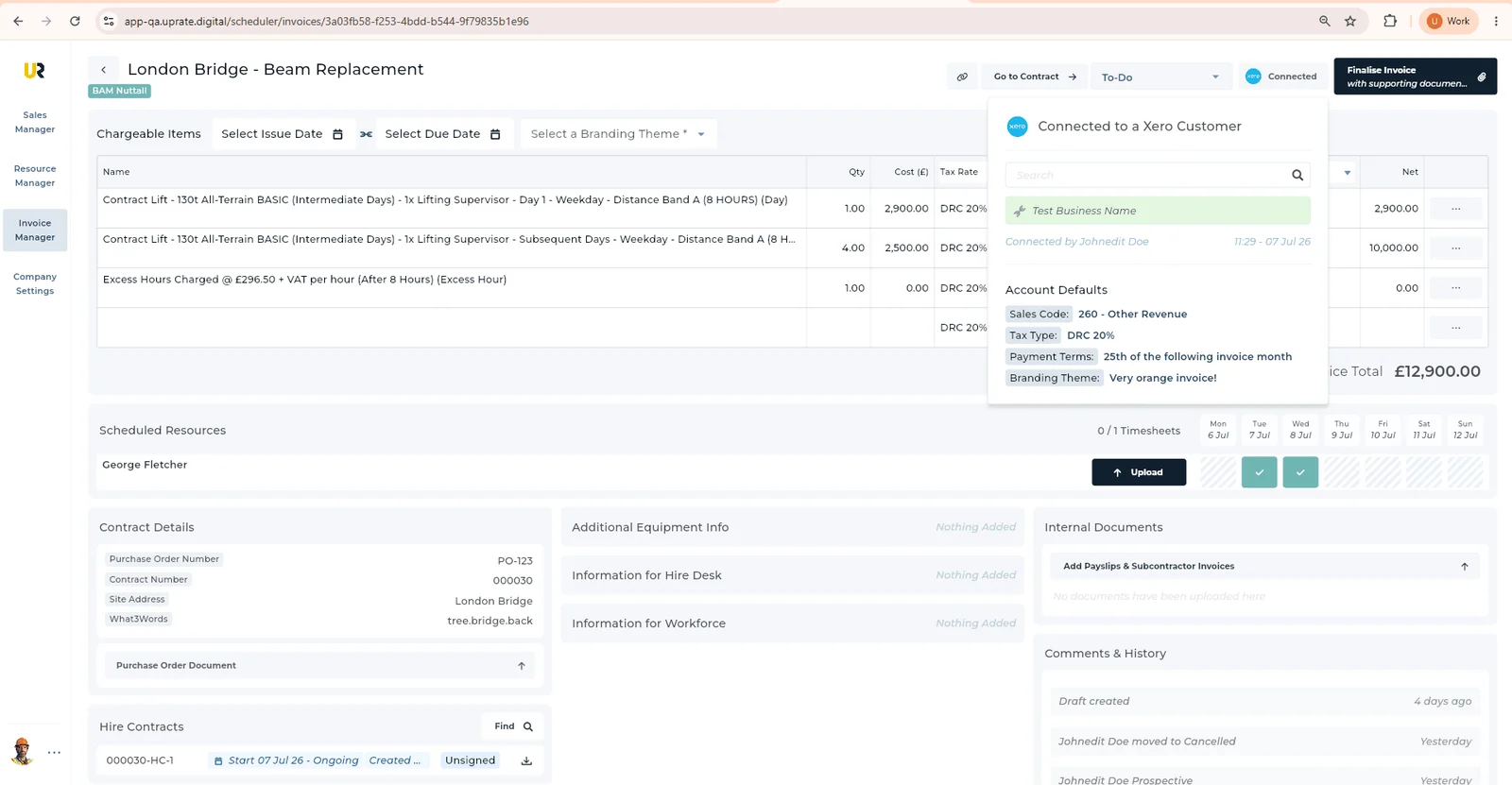
In UpRate, open the correct contract’s Purchase Order section. Enter the Purchase Order Number and upload the PO file separately. Check that the number saved and open the uploaded document to verify it. Deleting the file does not clear the number.
Make the next action explicit in the records and handover your team uses. Keep checking the order through your agreed office process when the hire changes.
Review references and supporting documents before sending
At invoice preparation, compare the buyer’s current order with the work being billed. Review dates, quantities, units, rates and any amendments. Confirm the PO reference appears where the customer expects it and that your own unique invoice number remains clear. GOV.UK lists the information invoices must include; the customer’s submission instructions are a separate check.
Choose the supporting documents the customer actually requires, such as the relevant hire paperwork, timesheets or delivery record. Open the final invoice and attachments before sending. Check the accounts recipient rather than assuming the site contact receives invoices.
Common purchase order questions
Is the PO number the hire contract number? Usually they identify different records: the buyer’s order and your contract. Store both and confirm which references the customer wants on the invoice.
Can one PO cover several weeks? It may, if the buyer’s order and process allow it. Check its period, value and quantity limits, and how previous invoices affect the remaining cover.
What if the hire changes after the PO arrives? Ask the authorised customer contact whether an amendment or additional order is required, then retain the confirmed instruction with the job.
Does having a PO guarantee payment? No. The invoice still needs to reflect the agreed work and follow the customer’s process. Keep clear records, check exceptions and use your normal accounts follow-up.
Keep the order with the hire.
Start with Sales Manager for customer and contract records. Compare modules for the invoicing and scheduling tools your team needs.
Get started Compare modules