
Following Up A Mobile Crane Hire Quote When The Job Keeps Changing
Give each outstanding crane hire quote a clear next action, keep changed requirements visible and check the booking separately when the customer decides.

Start With The Decision You Need
Follow up a mobile crane hire quote by checking the latest requirements, identifying the decision still needed and agreeing who will act next. Keep the proposed hire date separate from the follow-up date. A customer reply can change the work you priced, so read it before treating the quote as ready for booking.
A useful outstanding-quote list explains why each item is waiting. The customer might need a purchasing decision, your estimator might need a site detail, or your own team might need to revise the offer. These need different actions. Write the missing answer beside the enquiry so a colleague can pick it up without sending the same question again.
Keep A Small Record Beside The Quote
Before the next call, check the customer, site and document reference against the latest conversation. Then keep the following information together. This is a suggested office checklist, not a list of mandatory software fields.
- The quote reference and the version or date the customer has actually received.
- The proposed hire dates and any information still to be confirmed.
- The specific question holding up the decision, and who can answer it.
- The person responsible for the next action and the agreed follow-up date.
- Changes raised since the quote was prepared and whether they have been reviewed.
Treat A Changed Request As Work To Review
Illustrative example: a customer asks about a crane for Monday morning. On the follow-up call, they move the work to Tuesday and mention a different site entrance. Record both changes and ask the relevant colleague to review them. Check the current quote against the revised request before giving the customer a new commitment.
The date change needs an availability check; the access change may need further site or technical review. An office note cannot settle crane suitability, lifting arrangements or permission to work. The CPA's mobile-crane tendering guidance is useful background on procurement information and responsibilities. It is industry guidance, not a substitute for competent planning or the terms agreed for the job.
Ask A Question The Customer Can Answer
Use the agreed contact route and make the next question specific. For example: ‘You mentioned that the start date might move. Which date should we review availability for, and when will you know?’ This illustrative wording asks for information; it does not promise a crane, hold capacity or confirm a revised price.
Agree a sensible next contact based on the customer's decision process. Repeated reminders with no new question can leave both sides unclear about what is outstanding. If contact becomes promotional marketing, check the applicable rules before sending it: the ICO distinguishes business types and communication channels, and business contact details can still be personal data. Its linked guidance is currently under review. A diary reminder alone is not permission to send marketing.
Record The Outcome And Set The Next Action
After speaking to the customer, record what they said, what you agreed to do and anything still uncertain. If someone else must review a change, name that person and set the next check. Complete the action you actually performed; keep a separate next action for work that remains.
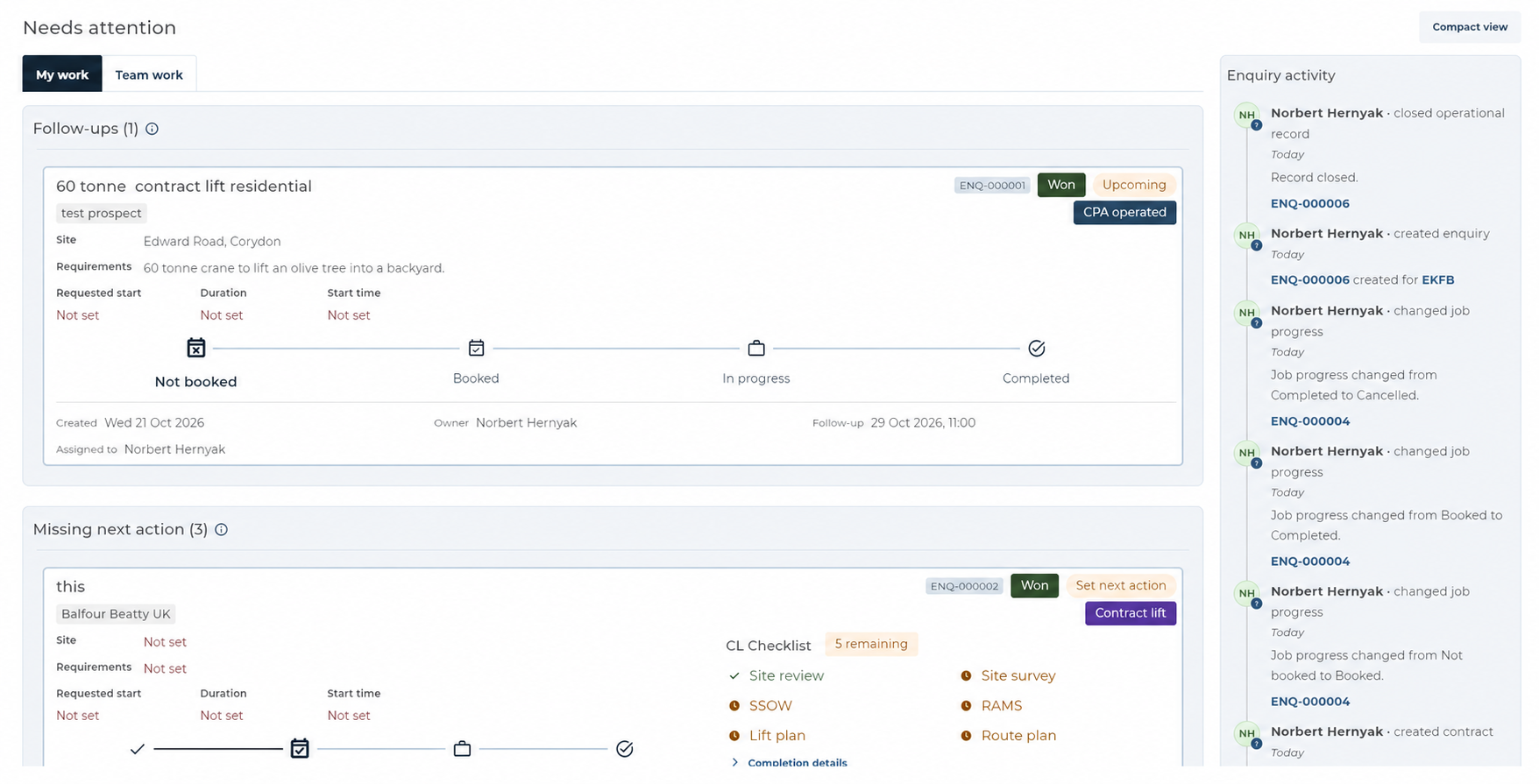
In UpRate, an enquiry can hold a next follow-up date, time and owner where the sales pipeline is enabled for the selected company. Add a Note or log a Call in the relevant activity section, then check the saved entry. Recording activity does not change the follow-up date or allocate resources. Complete follow-up and Clear follow-up also have different meanings: completion records the action as done; clearing removes the planned follow-up. The guide explains the saved-state checks and recovery controls.
Check The Booking After The Customer Decides
When the customer wants to proceed, reconcile the current customer request, Quote and contract details before handing work to operations. In UpRate, Quotes remain BETA and require Sales Manager access plus the company's sales-document feature. Creating or converting a Quote does not allocate resources, create an accounting invoice or record payment. Resource allocation is separate work in Resource Manager.
For an enquiry that is no longer proceeding, record the outcome and resolve any remaining follow-up deliberately. Closing an enquiry is separate from its sales stage and does not cancel a Scheduler booking. Check any existing allocation through the ordinary booking process so an old plan is not left behind.
Try The Follow-Up Workflow With Your Next Enquiry
Sales Manager CRM is free for one user. Check the features enabled for your company; larger teams and optional modules are paid. No credit card is needed to create your account.
Sign up for FREE Compare modules